



Desktop App
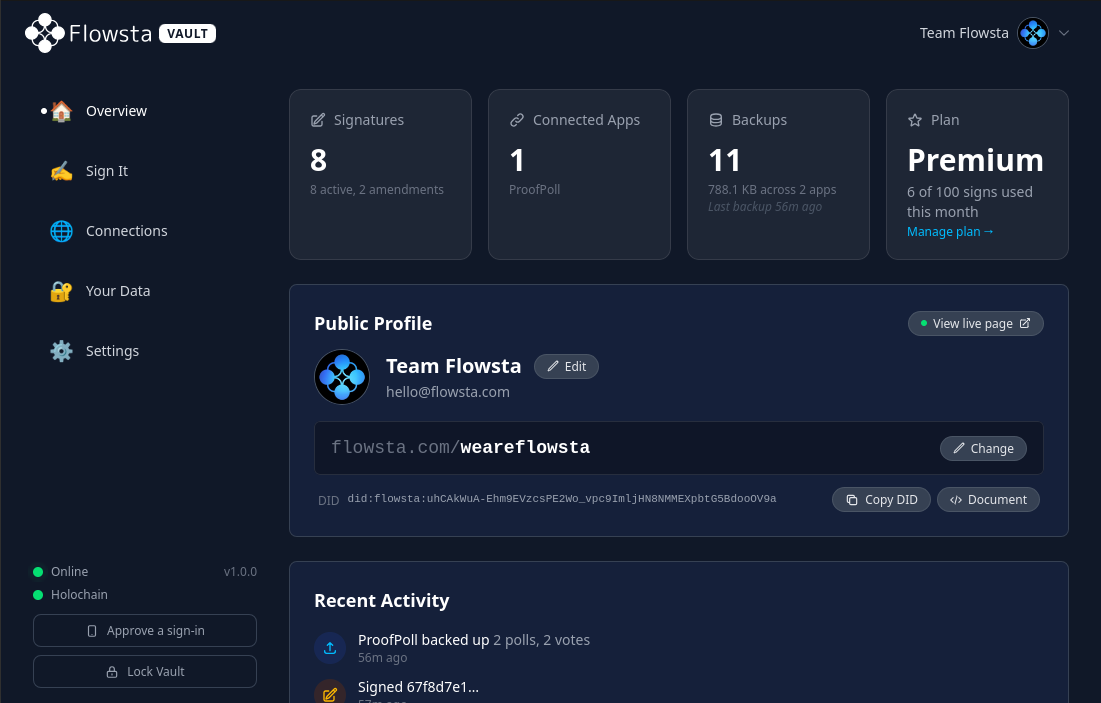
Flowsta Vault
The home of your Flowsta identity. It's created here and lives here - your keys, your data, your approvals, on your own machine - and you sign in everywhere with it.
Free & open source · Windows, macOS, Linux · v1.4.0 · released 17 Sep 2026 · what's new
What you get
Nobody can lock you out. Not even us. - your identity lives in your Vault, on your device - not in a company's database. There is no account to reset, leak, or shut down. That is what a decentralized identity means in practice, and every Vault makes the network a little stronger. How Flowsta identity works →
Keep encrypted backups of the apps that use it - apps built on Flowsta store their backups in your Vault, on your own machine. Your Own AI keeps your AIs, conversations and memory here - and brings them back on a new device with one click. Yours to export any time.
Sign your work with Sign It - files and creations, signed as you, provable by anyone, with your rights and AI policy declared. About Sign It →
Sign in with Flowsta - on websites and apps that value your privacy. No password, nobody watching; you approve each sign-in in your Vault.
Get Started
Download Vault
v1.4.0 · released 17 Sep 2026 · free & open source
macOS
.dmg · 44-45 MB
Not sure? Apple menu › About This Mac: "Chip" = Apple Silicon, "Processor" = Intel
Only ever download Flowsta Vault from the buttons above or directly from our GitHub releases page - never from anywhere else. The Vault is where you enter your password and your 24 words; a tampered build could take them. No third-party mirror, app store, or download site is a safe source. If in doubt, check you're on github.com/WeAreFlowsta.
Other formats - Linux .rpm, Windows .msi - are on the v1.4.0 release page. Comfortable with a terminal? Every release ships a SHA256SUMS.txt to check your download matches what we published. If that doesn't mean anything to you, you don't need it.
Setup
How It Works
Download and open Vault
Grab the installer for your computer from the download section above - Windows, macOS and Linux, free and open source - and open it.
Create your Flowsta identity
The Vault creates your identity on your device and gives you your 24 words - the key no one can reset or take from you, and the way back in on any computer. Write them somewhere safe. Had a flowsta.com account before the Vault? Sign in with it during setup and the Vault upgrades it - your username, data and signatures come with you.
Use it everywhere
Sign in across the web and in apps, sign files with Sign It, and approve every connection yourself. The Vault starts with your computer and locks when you step away - your keys stay yours.
Features
What's Inside
The security and design choices under the hood - so your keys, and your data, stay yours.
Encryption that holds
Your vault is encrypted with AES-256-GCM and your password is hashed with Argon2id - the same memory-hard scheme serious password managers rely on.
Zero-knowledge by design
Your recovery phrase and private keys are never stored unencrypted and never sent to a server. The key that signs as you lives in memory only while the vault is unlocked.
You approve every request
Apps must ask before they authenticate, link, or sign on your behalf. Choose which sites you trust, and revoke any connection at any time.
Always ready, always guarded
Starts with your computer and lives in the system tray, locked, so it's there the moment a site needs it. A configurable inactivity timeout (5 minutes to never) locks the vault and clears your keys.
Open source & signed
Flowsta Vault is MIT-licensed and fully public - read every line. Windows and macOS installers are code-signed, so your OS shows Flowsta as the publisher.
Recovery is the phrase
Your identity is a 24-word phrase. Restore it on any device with no reset email and no recovery process - the same phrase always rebuilds the same keys, even when Flowsta's servers are unreachable.