



Why this matters
Your work is training AI. Take back the terms.
Prove it's yours
Every signature is a timestamped, independently verifiable record of authorship - something you can point to if your work is copied, scraped, or contested.
Set the terms for AI
Declare how AI may use your work - allow or deny training, and open a licensing contact - right inside the signature, where anyone (including AI pipelines) can read it.
You're not just protecting your work - you're helping define how the next generation of AI values original human creativity. Every signature makes that new standard harder to ignore.
Find your fit
Who are you?
Tap the one that fits - we'll show you exactly how Sign It helps.
For Artists
Protect your art from unauthorised use
Worried AI scrapers, NFT minters, or content thieves will take your work and claim it as their own? Sign It gives you a public, verifiable record that proves authorship and declares exactly how your work can be used.
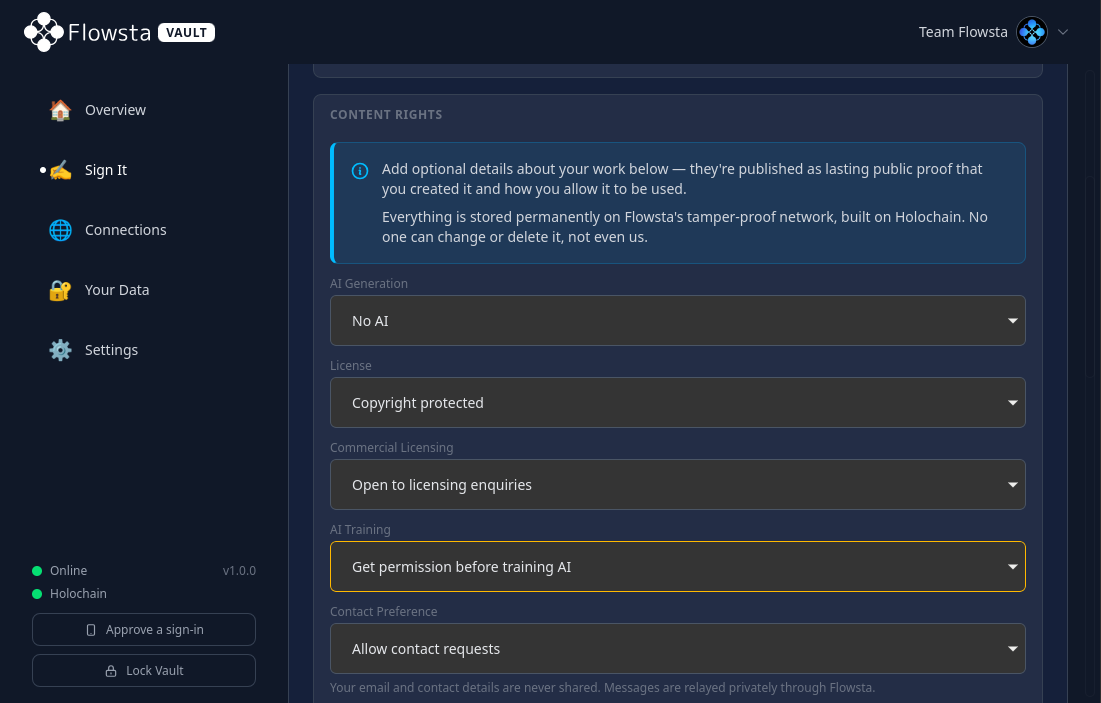
Declare exactly how your work can be used.
License, commercial availability, AI training policy, contact preference - every signature carries machine-readable rights that anyone (including AI pipelines) can check before using your work.
Prove you made it first
Every signature is timestamped and recorded publicly. If someone copies your work later, the timeline is on your side.
Tell AI to back off
Declare your AI training policy in the signature itself. Anyone - including AI companies - can read it before using your work.
License on your terms
Pick a Creative Commons or custom license. Allow contact for commercial use without exposing your email.
Why you can trust it
Verifiable - not "trust me"
You shouldn't have to take our word for it. Everything that matters is in your hands or out in the open.
No lock-in - take your data and go
Your identity and your records are yours. Export your keys and your data whenever you like and take them elsewhere - it's built into the licence Holochain runs on, not a favour we grant.
Proof that outlives us
Signatures live on the Flowsta network - built on Holochain, hosted across our servers and community members' computers. Even if Flowsta disappeared, the proof stays verifiable.
Open source you can inspect
The proof layer is open. Flowsta Vault and the Holochain code that records and checks signatures are public - you can see exactly how it works rather than trust a black box.
Anyone can verify - no account
Checking a signature is free and needs no login. Proof of authorship is only worth anything if anyone can check it - so anyone can.
Independent, built in Australia
Flowsta is a small, independent team building user-owned identity infrastructure, run on cooperative principles - decisions serve the people who use and build Flowsta, not outside shareholders. We don't sell data, don't run ads, and don't take venture capital that conflicts with our users' interests.
Artist spotlight
Creators putting it to work
Two of the artists signing their work with Sign It - and why.
I have welcomed the opportunity to have a way to prove my work is mine in the digital worlds. I use many platforms to show my work, and I realise that this leaves it open for digital use by others.
The ability to 'sign' works digitally, AND choose the way in which I accept re-use, is an incredible comfort in a complicated environment.
This system, its concept, its open platform and the deep ethical expertise behind it, is a godsend for us artists. Thank you Flowsta

Artist
As an Artist who has spent an entire creative career developing towards my most recent body of digital work, I have chosen to sign each of these works with Flowsta knowing that this will arm me with the strongest form of digital protection that is available.
I have signed my files as belonging to me so that the right to use, replicate or train off of is 100% my own and will stay that way.
I would encourage any artist that is serious about owning the rights to their work to do the same.

Singer / Songwriter
How It Works
Three Steps
Step 1
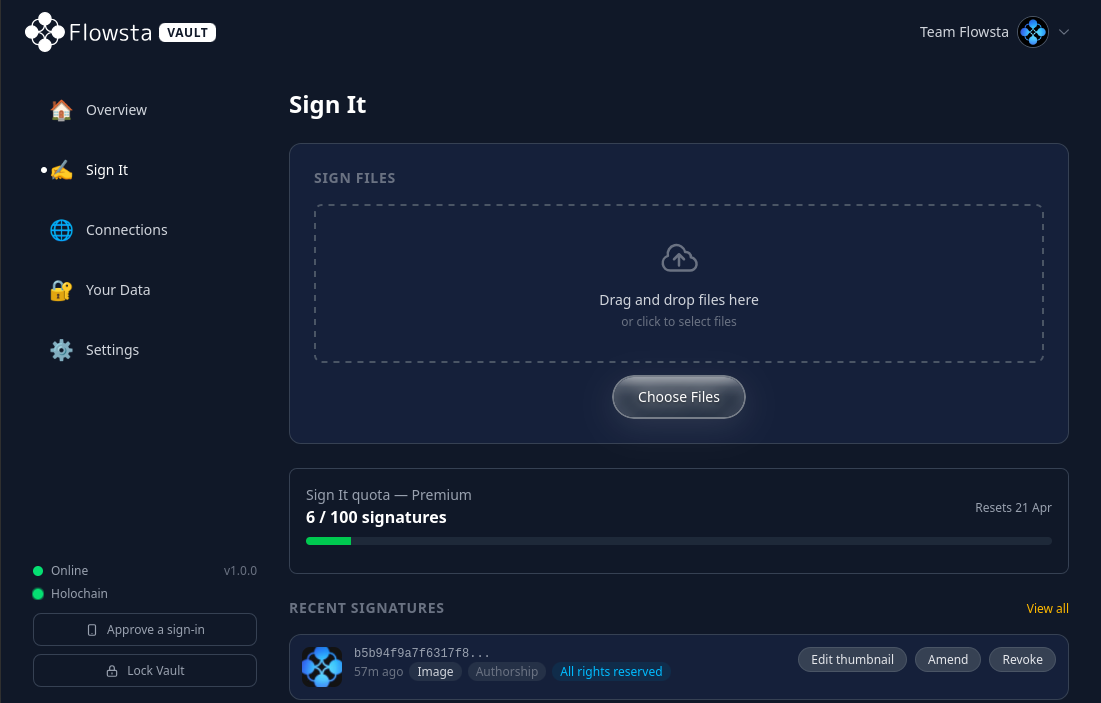
Sign your file
Drop a file into Flowsta Vault on your desktop, or sign from your dashboard at flowsta.com. Your file is hashed locally and signed with your private key.
Step 2
Recorded on Flowsta's network
Your signature, timestamp and content rights are recorded permanently on Flowsta's tamper-proof network, built on Holochain. No central server - no one can change or delete it, not even us.
Step 3
Verify anywhere
Anyone can drop a file on the verify page to check signatures. The file is hashed in the browser - nothing is uploaded. Free, forever.
What else you get
The small print nobody else offers
Proof that can't be peeled off
Every other approach has a way around it: watermarks get stripped, embedded credentials get deleted on upload, NFTs pin to one exact file a thief just crops past. Sign It's proof lives on the network - nothing to strip - and perceptual matching links edited copies back to your original.
Find your work in the wild
Perceptual matching catches resized, cropped, recoloured, recompressed and re-encoded copies - not just exact files. Spot stolen or scraped work even after it's been edited.
How perceptual matching works →Public creator pages
Every signer gets a public profile listing all their signed work. Use it as a verifiable portfolio - proof of authorship across your whole catalogue, in one link.
Private contact relay
Anyone interested in licensing or commissioning your work can message you through Flowsta. Your email address is never exposed - they reach you, you decide whether to reply.
Sign from your desktop with Vault
Flowsta Vault signs any file locally - right-click straight from your file manager on Linux, macOS or Windows, and sign huge files up to 10 GB with no upload.
Get Flowsta Vault →Revoke or amend anytime
Change your mind or release a new version? Publicly revoke a signature, or amend it with an updated one - every change is itself signed and visible. Nothing is silently deleted.
Why Sign It
How it compares to the alternatives
Most provenance tools embed credentials inside your file. The problem: nearly every platform strips metadata on upload - Instagram, X, WhatsApp, most CMSes. Your proof of authorship disappears silently. Sign It stores nothing in your file. The signature lives on a distributed network, indexed by hash. Strip whatever you like - the proof remains.
| Sign It | C2PA / Adobe | Forensic watermark | Blockchain NFT | DocuSign | |
|---|---|---|---|---|---|
| Cost per signature | Free / paid plans | Tied to Adobe | Enterprise pricing | Gas fees ($1-$50+) | Paid only |
| File hosting | Not stored anywhere | Embedded in file | Embedded in pixels | IPFS/centralised | On their servers |
| Open ecosystem | Yes - anyone can verify | Adobe-led standard | Proprietary detector | Chain-specific | Vendor lock-in |
| Open source / auditable | Yes - Vault + all DNAs | Open standard, Adobe tooling | Proprietary | Chain public, contracts vary | Proprietary |
| AI training disclosure | Built in | Partial | No | No | No |
| Multi-signer | Yes | Yes | No | No (1 mint) | Yes |
| Revocable | Yes | No | N/A | No (immutable) | Limited |
| Privacy on verify | Hashed in browser (file only sent for similar-match, then discarded) | Local | Server-side | Public chain | Server-side |
| Works offline | Yes (Vault) | Yes | No | No | No |
| Survives metadata stripping | Yes - signature is on the network, not in the file | No - most platforms strip it on upload | Yes - mark is in the pixels | N/A | N/A |
| Survives vendor shutdown | Yes - the network + your recovery phrase | No - Adobe Verify required | No - needs their detector | Depends on chain | No |
| Verifies actual file content | Yes - SHA-256 hash of the file | Yes | No - detects its own mark | No - token points to a URL | No - verifies identity only |
| Finds modified copies | Yes - perceptual fingerprint on the network | No | Yes - but the mark can be stripped | No | No |
| Proof can be stripped off? | No - lives on the network | Yes - on upload | Yes - collusion / AI | No - but pinned to one exact file | N/A |
Comparison reflects typical use cases. Each tool serves valid but different needs.
Questions
Frequently asked
When should I sign - before or after I publish?
Before you publish, ideally. Signatures are timestamped, so signing before the work goes online gives you the earliest possible record that it's yours - the strongest footing if it's ever copied or contested.
That said, it's still well worth signing work that's already out there. Because Sign It uses perceptual matching, your signature isn't bound to one exact file: sign your original and the copies already circulating on social media - resized, recompressed, re-uploaded - can still be matched back to it. Someone who downloads the version doing the rounds and verifies it will see your signature. Earlier is better, but signing late beats not signing at all.
What can I declare about my work?
Quite a lot - and it all travels with the signature as public, machine-readable terms anyone can check. When you sign you can declare:
• Licence - how others may use the work (a Creative Commons licence, or your own terms).
• AI training - explicitly allow or deny use of your work to train AI; pipelines can read this before they ingest it.
• Commercial use - whether the work is available for commercial licensing.
• Contact - let people reach you about licensing through a private relay, without exposing your email.
• AI-use disclosure - state whether the work is human-made, AI-assisted, or AI-generated.
You can also add an optional note and a signing intent (authorship, approval, witness, and so on). It's all optional - sign with as much or as little as you like - and anything you declare is published with the signature for a buyer, a platform, or an AI pipeline to read.
How do I know I can trust Sign It - what does "verifiable, not trust me" mean?
"Trust me" is exactly what a provenance tool shouldn't ask for. You don't have to take our word for any of this - here's why:
The proof doesn't live on a Flowsta server. Every signature - the file's SHA-256 hash, your Ed25519 signature over it, the timestamp, and the declared content rights - is written to a public Holochain DHT and replicated across many independent nodes. There's no central database we could quietly edit, lose, or be compelled to hand over.
The code that creates and checks signatures is open source. Flowsta Vault is MIT-licensed and public, and all three Holochain DNAs Flowsta runs are Apache-2.0 and public:
• flowsta-signing-dna - the Sign It signing logic (Ed25519 over file hashes)
• flowsta-identity-dna - public profiles and DID resolution
• flowsta-private-dna - your encrypted private data
Those exact DNAs are bundled inside the open-source Flowsta Vault, so you can read the source, build it yourself, and confirm the same DNA - identified by its content hash - is what actually runs.
You hold the keys. Your signing key is derived from your 24-word recovery phrase (HMAC-SHA256 → Ed25519) and lives in Vault on your own device - never on our servers. Only the holder of that key can sign as you, and only you can export it.
No lock-in. You can export your keys and your data at any time and keep using them on any compatible Holochain conductor. User data portability isn't a feature we chose to be nice - it's a core requirement of the Cryptographic Autonomy Licence that Holochain itself is released under.
Anyone can verify - no account. Verification is free, open, and needs no login: drop a file on the verify page or query the public API. (Our hosted web API is just a convenience layer for the website - it isn't where your proof lives, and the open-source Vault reads and writes the same network without us in between.)
How does perceptual / similar-file detection work?
Cryptographic hashing (SHA-256) changes completely if even a single byte changes - perfect for proving an exact file, useless for finding edited copies. Perceptual hashing is the opposite: it produces a fingerprint of what the content looks or sounds like, so near-duplicates produce near-identical fingerprints.
When you sign a supported file, Sign It computes that fingerprint and stores it on the Holochain DHT next to your signature. The fingerprint is split into smaller bands (buckets) so a verifier can pull candidate matches that share any band without scanning the whole network, then rank them by how close the full fingerprints are - a Hamming-distance similarity score, which is the "Similar (87%)" figure you see on a fuzzy match.
By media type: images use pHash, a DCT-based perceptual hash robust to resizing, recompression, format conversion and small colour/brightness shifts; audio uses Chromaprint (the acoustic fingerprinting behind Shazam-style matching), so a re-encode, bitrate change or format swap still matches; video uses frame-sampled perceptual hashing across sampled frames.
What survives: resizing, cropping (within reason), recompression, re-encoding, format conversion and minor edits. What won't: heavy re-composition, very aggressive crops, or content changed beyond recognition - at that point it isn't really your file any more.
Privacy: the file is sent to the server only to compute the fingerprint when there's no exact SHA-256 match, and is discarded immediately. The bytes are never stored.
Is what I sign public? Who can see it?
Signing is public by design - that's what makes it useful as proof. What goes on the network is the file's hash, your signature, a timestamp, your public identity, and any rights you declared. Your signatures also appear on your public creator page, which doubles as a verifiable portfolio of your work.
What stays private: the file itself never leaves your device - only its hash is recorded, so the contents aren't published. Your email isn't exposed either; people can only reach you through the optional contact relay, and only if you turn it on. And signing is always your choice - if you'd rather a piece not be publicly tied to you, simply don't sign it.
What if someone signs my work before I do?
Sign It records who signed what, and when - it doesn't gatekeep who's allowed to sign a given file, so in principle anyone could sign a copy of your work. What protects you is that every signature is public, timestamped, and tied to an identity, so anyone verifying sees the whole picture rather than a single unchallenged claim.
If you signed first, that earlier timestamp is strong evidence of priority. You can also add your own signature even when someone else got one in first - both show up together - and an established creator profile with a signing history carries weight that a throwaway identity doesn't. It's the clearest reason to sign early: the earliest, identity-backed signature is the one that holds up.
Does signing prove copyright, or hold up legally?
Signing gives you strong, independently verifiable evidence that a specific file existed, that you signed it, and when - together with whatever rights you declared. That's genuinely useful if your authorship is ever questioned.
What it isn't is a copyright registration or legal advice. In most places copyright arises automatically when you create something, and formal registration (where it exists) is a separate process. Think of a Sign It signature as a clear, timestamped, tamper-evident record you can point to - a strong piece of evidence, not a courtroom guarantee. For anything high-stakes, check with a lawyer in your jurisdiction.
Where do I sign - flowsta.com or Flowsta Vault?
Either surface works - and in both cases the signing itself happens in your Flowsta Vault, with your keys, on your device.
• Flowsta Vault (the open-source desktop app for Linux, macOS and Windows) is where your identity lives. Drop a file in, or right-click it in your file manager - it signs entirely on your machine, handles files up to 10 GB, and works offline.
• The flowsta.com dashboard is a convenient front end: drop a file in your browser and your Vault pops up to approve the signature. Same identity, same signature, same network.
Your recovery phrase restores the same identity on any machine, so you're never tied to one device.
How do I verify a file or signature?
Verifying is free, open, and needs no account.
Check a file - drop any file on the verify page. It's hashed in your browser and matched against the network; if there's no exact match, perceptual matching looks for edited copies. You'll see who signed it, when, and the rights they declared.
Browse a creator - every signer has a public profile at flowsta.com/<username> that lists everything they've signed, so you can check a piece against their verifiable portfolio in one place.
Verify in code - developers and AI companies can check signatures programmatically through the free, unauthenticated API:GET https://auth-api.flowsta.com/api/v1/sign-it/verify?hash=<sha256>It returns the matching signatures and declared content rights as JSON - no key, no account. Full reference in the Sign It API docs.
What does it cost?
Verifying is always free and needs no account.
Signing comes with a monthly allowance of signatures that resets on your billing date:
• Free - 2 signatures per month.
• Premium ($10/month or $100/year) - 100 signatures per month, plus shorter usernames and priority support.
• Premium Plus ($50/month or $500/year) - 1,000 signatures per month, and a 5-character username included.
Full details on the Premium page.
Building signing into your own app or product? You can add Sign It through the Flowsta API and SDK, with its own plans and higher volumes - see dev.flowsta.com for pricing and docs.
For developers
Add Sign It to your app - OAuth scope, JS SDK, webhooks, and a free public verify API.
Build with Sign It →For AI companies & platforms
Check a file's declared rights before you train - one API call, no key, no account.
Check before you train →