



Desktop App
Flowsta Vault
Your sovereign hub on your desktop. Manage your identity, sign your files with Sign It, and run third-party apps — all without anyone else holding the keys.
Free & open source · Linux, macOS and Windows.
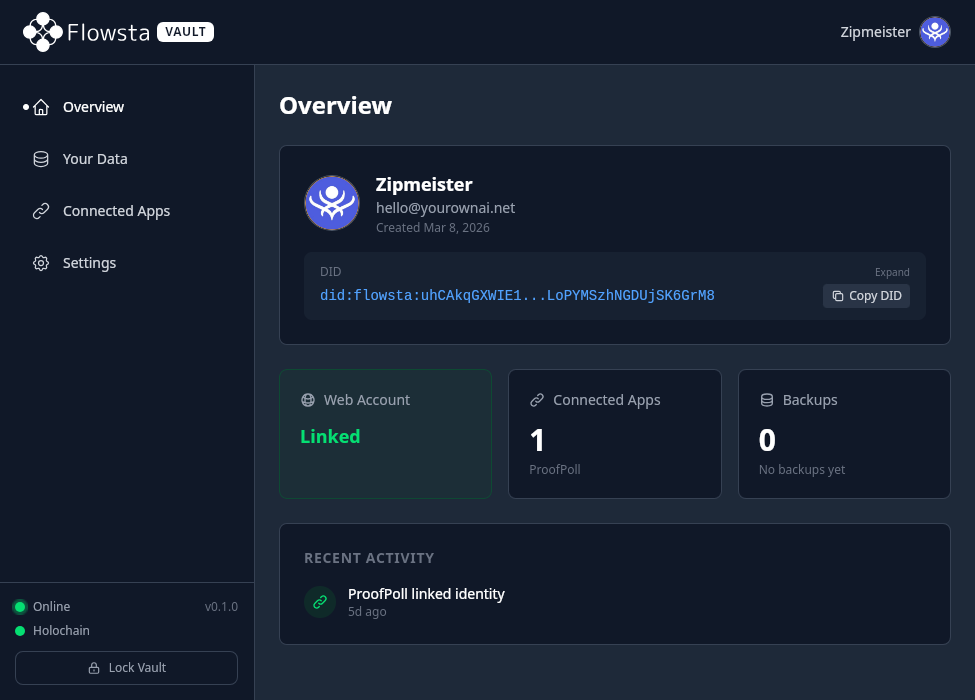
Your identity, on your machine.
Flowsta Vault runs a local Holochain conductor directly on your desktop — your private keys never leave your computer, and your 24-word recovery phrase is never stored at all.
Link your desktop identity to your web account with cryptographic attestations, and connect third-party apps with a single click.
What you can do
More than an identity manager
Vault is your local hub for everything sovereign on Flowsta.
Sign your files with Sign It
Cryptographically sign any file — declare your rights, AI policy and authorship. Right-click from your OS file manager to sign without leaving where you are, and sign files up to 10 GB locally with no upload.
About Sign It →Run third-party Holochain apps
Vault hosts a local Holochain conductor. Apps install side-by-side with your identity, and you approve every connection.
Offline desktop logins
Sign in to Holochain apps on your machine without an internet connection. Your identity is on disk, not on someone else's server.
One identity, every device
Cryptographically link your desktop vault to your web account. Same identity in your browser, on your phone, and in Vault — all proven by you.
Setup
How It Works
Create your 24-word recovery phrase
Sign in to your Flowsta dashboard and generate a recovery phrase under Settings → Password. This phrase is the cryptographic seed for your identity — write it down and store it somewhere safe.
Download Vault
Grab the installer for your platform from the download section below. Linux, macOS and Windows are all supported — free and open source.
Install, sign in, and link
Open Vault, sign in with your Flowsta account, and enter your 24-word phrase. Your desktop identity is generated locally and automatically linked to your web account via a cryptographic attestation. No copy-pasting keys, no manual sync.
Sign files, connect apps, stay sovereign
Use Vault to sign files with Sign It, install third-party Holochain apps, and approve every connection. Vault auto-locks when you step away — your keys stay yours.
Features
What's Inside
Everything you need for sovereign identity management, built with security as the foundation.
Local-First Architecture
Flowsta Vault runs a Holochain conductor directly on your machine. Your identity data, private keys, and encrypted credentials never touch a remote server.
Offline Desktop Logins
Sign in to Holochain apps on your desktop using your Flowsta Identity — no internet connection required. Your vault links your desktop and web identities so apps recognize you everywhere.
Military-Grade Encryption
Your vault is encrypted with AES-256-GCM and your password is hashed with Argon2id — the same memory-hard algorithm used by password managers and security-critical applications.
Auto-Lock & System Tray
Configurable inactivity timeout (5 minutes to never) automatically locks your vault. Minimises to your system tray so it's always ready when you need it.
Encrypted Backups
Apps connected to your vault can store encrypted backups locally. AES-256-GCM encrypted, per-app storage limits, and you can export or delete them at any time.
24-Word Recovery Phrase
Your identity is derived from a BIP39 recovery phrase. Write it down, store it safely, and you can restore your identity on any device at any time — no account recovery process needed.
Get Started
Download Vault
Early Release
Flowsta Vault is in its first public release. Core functionality is stable, but you may encounter rough edges. We'd love your feedback — report issues on GitHub.
Linux
Debian .deb
x86_64
macOS
Apple Silicon .dmg
Apple Silicon
Windows
.msi
x86_64
Need a different build?
For other formats — Intel Mac (.dmg), Linux .rpm, Windows .exe — head to the v0.5.2 release on GitHub to see the full list of installers for this version.
Only ever download Flowsta Vault from the buttons above or directly from our GitHub releases page — never from anywhere else. Vault is where you enter your password and 24-word recovery phrase, and a tampered build could steal them and take control of your identity. No third-party mirror, app store, or download site is a safe source. If in doubt, always verify you're on github.com/WeAreFlowsta.
Verify your download is genuine
Each release includes a unique fingerprint. Check that your downloaded file's fingerprint matches the one on GitHub to make sure nothing was changed in transit.
Open a terminal in your downloads folder and run:
Linux / macOS: sha256sum flowsta-vault-*
Windows (PowerShell): Get-FileHash flowsta-vault-*
Compare the output to the checksum listed in the GitHub release notes. They should match exactly.